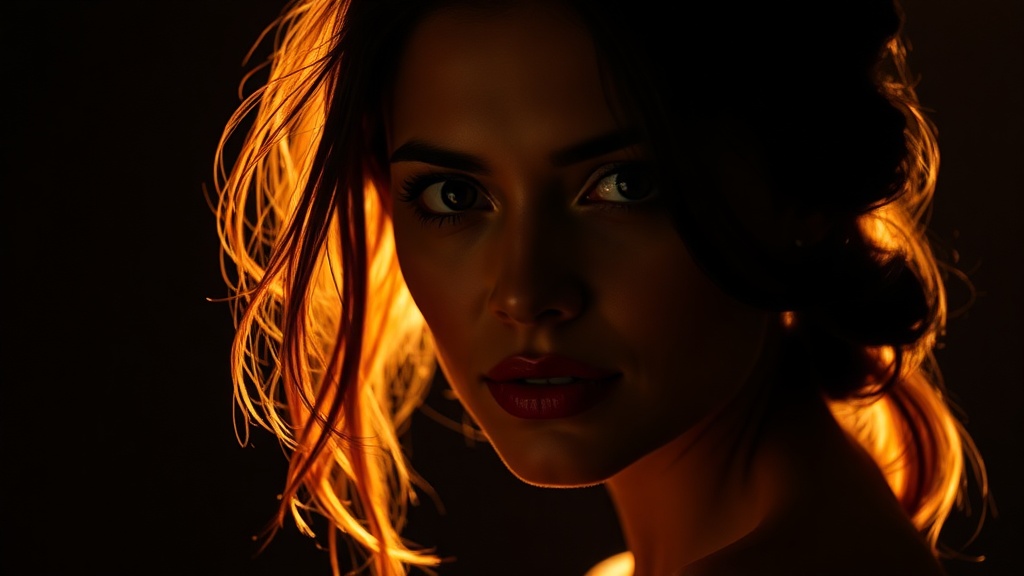
How to Use Backlighting for Dramatic Portraits Without Silhouettes
You're framing a portrait at sunset. Your subject's face falls into shadow while the background glows brilliant orange—and your camera keeps exposing for that sky, turning your subject into a dark silhouette. Most photographers either accept the silhouette or pop up the on-camera flash, producing flat, unflattering light that kills the mood entirely. There's a better path. Backlighting—when the primary light source sits behind your subject—can produce luminous, three-dimensional portraits with a dreamy, almost ethereal quality. The trick isn't fighting the light. It's balancing it.
Why Does My Camera Struggle with Backlight?
Your camera's metering system wants to render everything as middle gray. When a bright sky or window dominates the frame, the camera assumes the scene is brighter than it actually is—and underexposes your subject to compensate. This creates those frustrating silhouettes that frustrate beginners.
The solution starts with metering mode. Switch from evaluative (or matrix) metering to spot metering. Position the metering point over your subject's face. The background will blow out slightly—but that's often preferable to a shadowed face. Alternatively, use exposure compensation. Dial in +1 to +2 stops of exposure and watch your subject emerge from the shadows while the background retains its character.
Shooting in manual mode gives you the most control. Set your aperture for your desired depth of field—perhaps f/2.8 for a creamy background or f/5.6 if you need both eyes tack sharp. Then adjust shutter speed until the subject's face reads correctly on your histogram. Don't worry if the sky clips. A slightly overexposed background often enhances that dreamy, backlit aesthetic.
How Can I Keep My Subject's Face Properly Exposed?
Balancing exposure is only half the battle. You need light on your subject's face—and that means reflecting or adding light from the front.
A reflector is your simplest tool. Position it opposite the light source (so if the sun is behind your subject's right shoulder, place the reflector to their left front). Silver reflectors provide punchy, cool fill that works well in bright conditions. White reflectors offer softer, warmer fill—ideal for golden hour when you want to maintain that warm tone. Gold reflectors can work, but use them sparingly; they cast a very warm tone that can look unnatural on skin.
Size matters. A 42-inch reflector is versatile enough for three-quarter portraits. For tighter headshots, a smaller 22-inch model works—and won't catch as much wind outdoors. Have an assistant hold the reflector, or invest in a reflector holder that mounts on a light stand. The reflector should sit slightly above your subject's eye line, angled downward—mimicking natural light and avoiding that "lights from below" horror effect.
If reflectors aren't practical, try fill flash. But not that harsh direct flash from your camera's hot shoe. Instead, use an off-camera flash bounced into a white umbrella or softbox. Set the flash to 1 to 2 stops below your ambient exposure—you want it to fill shadows, not overpower the natural backlight. Many photographers call this "kissing" the subject with light—just enough to open up the shadows without destroying the atmosphere.
High-speed sync (HSS) becomes your friend here. Standard flash sync speeds top out around 1/200th or 1/250th of a second—fine for interiors, but limiting in bright sunlight where you might want f/1.8 for shallow depth of field. HSS lets you sync at any shutter speed, though it reduces flash power. Position the sun behind your subject, dial in that wide aperture, and let HSS balance the exposure.
What Camera Settings Work Best for Backlit Portraits?
Backlighting rewards specific technical choices. Start with lens selection. Lenses with strong contrast and resistance to flare help maintain image quality when pointed toward the sun. That said, controlled flare can be beautiful—many portrait photographers seek out vintage or lower-contrast lenses specifically for that organic, glowing character.
Shooting wide open—f/1.4 to f/2.8—creates separation between subject and background while allowing the backlight to wrap around your subject's edges. This rim light separates hair and shoulders from the background, adding dimension. Watch for chromatic aberration (purple fringing along high-contrast edges) when shooting wide open into light. Most modern editing software can correct this automatically.
Your white balance setting matters more than usual. Daylight or shade presets often work better than auto white balance, which can swing wildly as your subject moves or clouds pass. Shoot RAW (you probably already do) so you can fine-tune white balance in post without penalty.
Consider your focus carefully. Autofocus systems sometimes hunt when pointed into strong light. Switch to single-point autofocus and place the focus point over a high-contrast area of your subject's face—usually the eye closest to camera. If your lens keeps searching, use your hand to block the sun temporarily, acquire focus, then remove your hand and shoot.
How Do I Handle Lens Flare and Haze?
Some flare adds atmosphere. Too much destroys contrast and makes your image look muddy. A lens hood helps, but with the light source in the frame or directly behind your subject, hoods offer limited protection.
Positioning is key. Slight adjustments—moving a few feet left or right, or asking your subject to shift—can dramatically change how flare behaves. Some photographers embrace flare as a stylistic choice, letting light bloom across the frame. Others want clean, contrasty images. There's no right answer—just intentionality.
If flare is reducing contrast more than you'd like, shoot a "flare-free" reference frame by blocking the sun with your hand or a flag, then blend exposures in post. Or simply embrace the haze. Soft, low-contrast images have a filmic quality that many clients and viewers love.
For more technical depth on balancing flash with ambient light, David Hobby's Strobist blog remains the definitive free resource. If you're interested in how professional portrait photographers use natural light creatively, B&H Photo's guide to backlit portraits offers excellent visual examples. And for understanding how different reflector surfaces affect skin tones, Digital Camera World's reflector tutorial breaks down the practical differences.
Common Mistakes to Avoid
Don't place your subject directly in front of the light source—unless you want a silhouette. Offset the light by 30 to 45 degrees so it wraps around them rather than blasting straight through. This positioning creates that beautiful rim light while still illuminating the front of their face.
Watch your backgrounds. Backlighting works best when the background has some texture or interest—foliage, architecture, or even a textured wall. A blown-out white sky behind your subject looks amateur. Seek locations where the background elements catch that backlight and add visual interest.
Finally, communicate with your subjects. Backlit conditions often mean they're looking toward a bright light source—uncomfortable for them. Have them close their eyes until you're ready to shoot, then open on your count. Or position them so the light skims behind them rather than hitting their eyes directly.
Backlighting isn't a trick or a workaround—it's a deliberate creative choice that produces images with depth, atmosphere, and emotional resonance. The next time you find yourself shooting into the sun, don't automatically reposition. Instead, grab a reflector, adjust your exposure, and see what happens when you let the light flow through rather than merely bounce off.